
How to Post a Job on Glassdoor?
Glassdoor is a prominent online platform that offers valuable insights into company reviews, salaries, and job postings. It empowers employers with unique opportunities to enhance their employer brand, attract exceptional talent, and interact effectively with prospective candidates. By engaging with potential candidates on Glassdoor, employers can establish a transparent and compelling employer brand, resulting in enhanced recruitment outcomes. In this blog, we will learn how to post a job on Glassdoor and share tips to optimize your job postings.
What’s New With Glassdoor?: The Partnership with Indeed
Glassdoor, a global leader in job and company insights, has partnered with Indeed to revolutionize the job posting experience. While maintaining their distinct brands, the two sister companies, both owned by Recruit Holdings, aim to enhance how employers attract and hire talent.
This collaboration leverages the strengths of both platforms, enabling employers to reach over 80% of online job seekers. Employers can now post jobs on both Glassdoor and Indeed through Indeed’s job advertising products, ensuring greater hiring efficiency and a streamlined experience.
Additionally, employers can access reviews and ratings from both platforms within the Glassdoor Employer Center. This integration provides deeper insights into employee beliefs and workplace culture, helping employers engage with candidates and make informed hiring decisions. This update also impacts how to post a job on Glassdoor, as the process is now integrated with Indeed.


How to Post a Job on Glassdoor Through Indeed?
To ensure optimal use of Glassdoor, having a comprehensive guide outlining the steps involved in posting a job there at your disposal can serve you well and make your hiring process seamless. Here are the steps you need to follow to post a job on Glassdoor:
Step 1: Visit the Glassdoor Website
Follow the steps below to post a job on Glassdoor through Indeed:
Visit the Glassdoor job posting page or click on this link: https://www.glassdoor.com/post-job/. By clicking on ‘Get Started with Indeed’, you will be redirected to Indeed to create an account.

2. Now, click on ‘Post a Free Job’ to leverage Glassdoor’s free job posting. Follow the next steps to create an account.

Step 2: Create an Account on Indeed
To post a job on Indeed, you will be required to create an account and register with your official email address. Follow these instructions to create an account:
1. Fill in your official email address or continue with Google for seamless registration.

2. Fill in the required fields to create an employer account. Mention your company name, number of employees, your name, how you came to know about Indeed, and your contact number. Click on ‘Create Account’ to successfully register with Indeed.
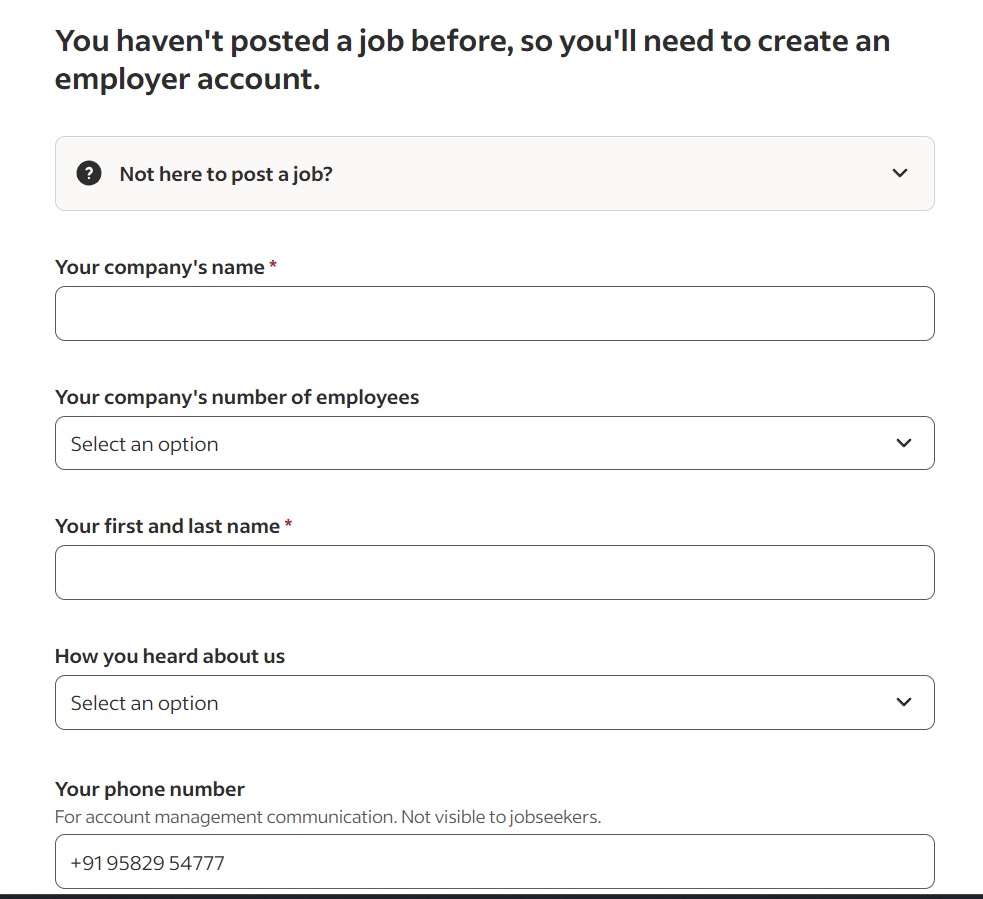
Step 3: Post a Job on Glassdoor + Indeed
Once you have successfully created an account, you will be redirected to the job posting page. Follow these steps to craft your job posting seamlessly:
- Begin your job posting process by providing basic job information. Provide your company’s industry and a description that includes company background, values, work culture, and mission. It allows you to attract culturally fit candidates for the job vacancy. Also, by writing a clear job title, you can ensure proper communication.

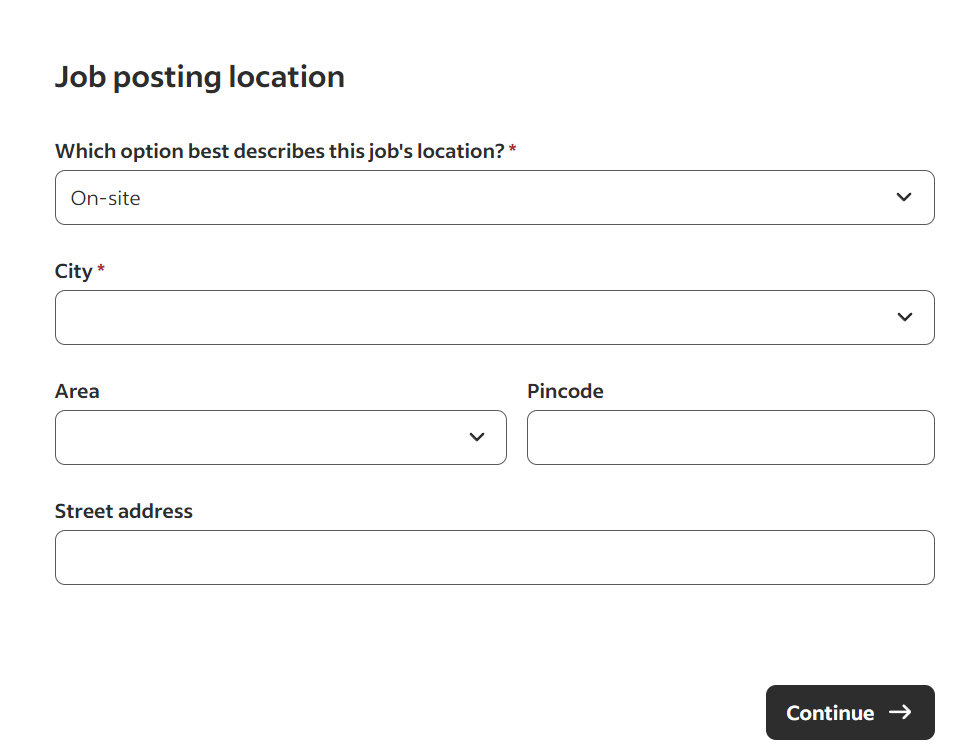
- Next, provide details about the job location. It can further refine your search and attract candidates willing to commute to the office as defined by the company guidelines. Click on ‘Continue’ to move on to the next step.
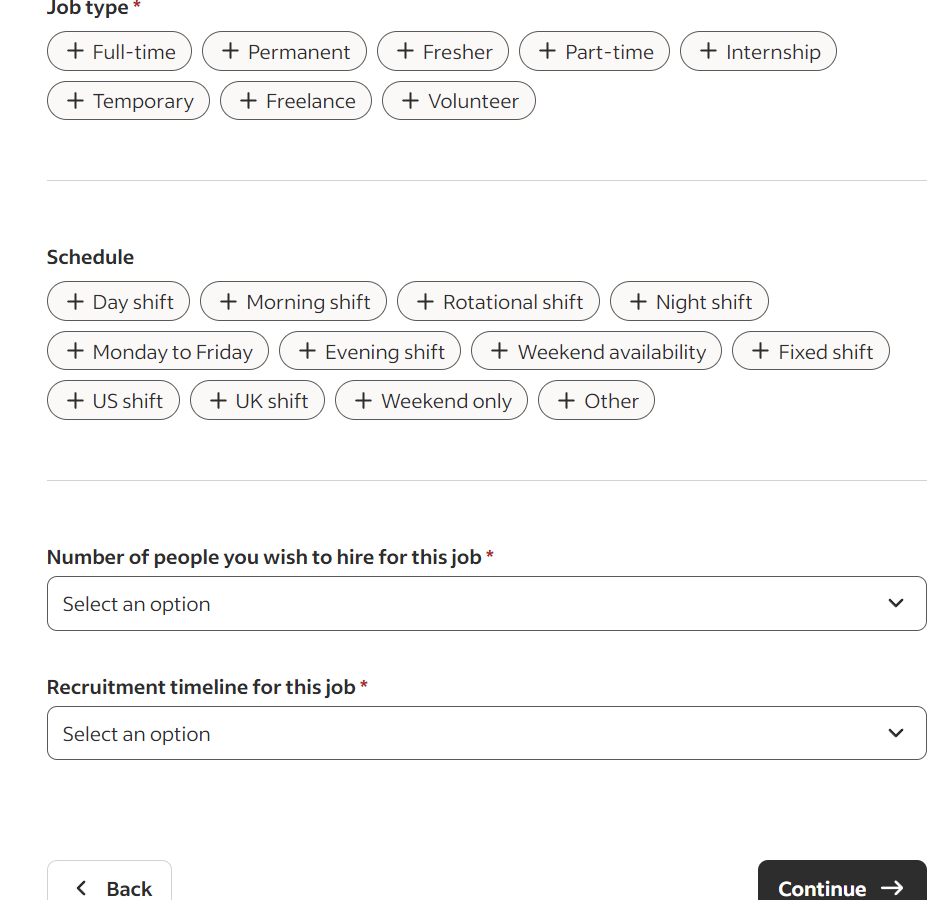
- Add more job details to provide comprehensive information about what the job requires. By providing the required information, you can help candidates make informed decisions and attract professionals who meet the requirements. Click on ‘Continue’.
- By including compensation details, you can attract the candidates you want. It is recommended to offer compensation packages in line with industry trends, responsibilities, and candidates’ profiles. Moreover, by offering a range of employee benefits, you can boost productivity, employee satisfaction, and retention.

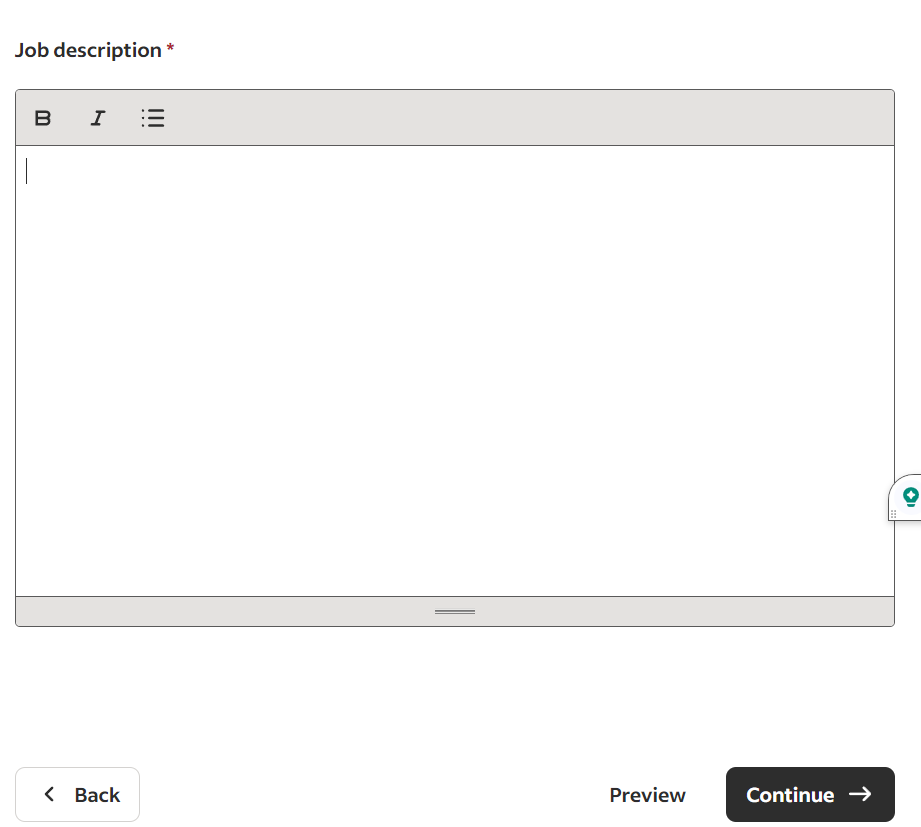
- Next, write a detailed yet concise job description that outlines the role, responsibilities, skills, and other job requirements. To learn how to write a job description, provide a brief overview of the reporting structure and key responsibilities. Further, list all the responsibilities to inform candidates what the position entails. Listing essential qualifications and skills is vital for attracting the candidates you want and refining your search process.
Click on ‘Preview’ to carefully proofread the job description and other details. Ensure the information provided is factually correct, follows a professional tone, and is grammatical/spelling error-free.
- Enter your email address to provide a channel for communication about your job posting and responses. Moreover, select whether you require candidates to submit their resumes as part of the application process. Click on ‘Preview’ to view your job posting or click on ‘Continue’.

7. Review your job posting to ensure the information is correct and aligns with your requirements. Edit any detail by clicking on the ‘edit icon’ as per your preferences. Click on ‘Preview’ to view your job posting or click on ‘Confirm’ to continue with the process.

Step 4: Optimize Your Job Posting
After providing job posting details, Indeed offers features to optimize your job posting and attract the candidates you want. Steps to optimize your job posting are detailed below:
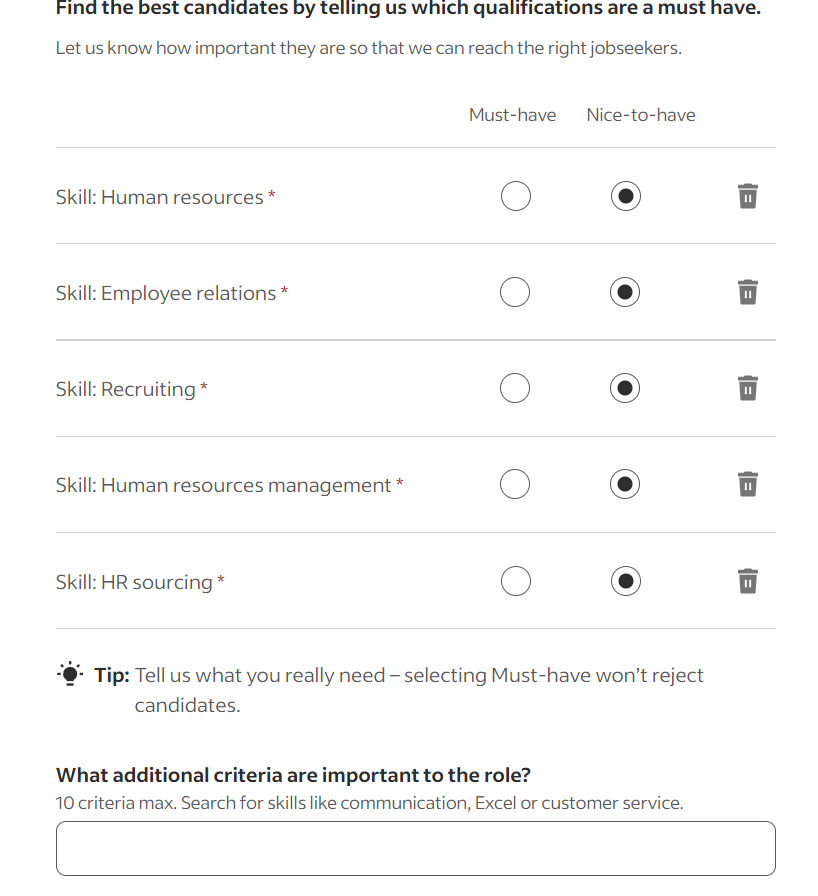
- Select or remove key skills you desire to source qualified candidates for the position. You can also mention any other skills (maximum 10) you seek in your candidate. Indeed provides the option to ‘Skip’. However, it is recommended to use this feature wisely, as it can help incorporate the skills required to excel in the position.
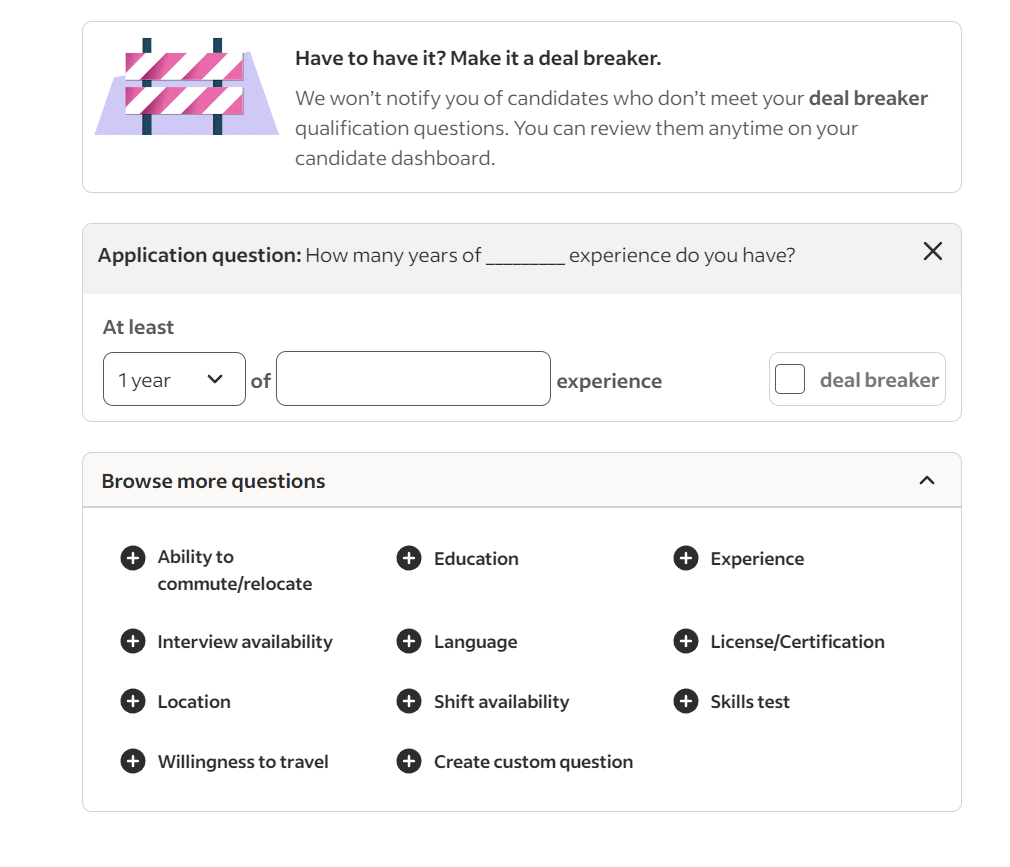
- Indeed also offers pre-screening for applicants, where you can select questions as deal breakers. For instance, if you choose ‘Experience’, Indeed will ask the applicant questions about their experience and match it against your defined requirements. If it does not match, Indeed will reject the candidate’s application without informing them.
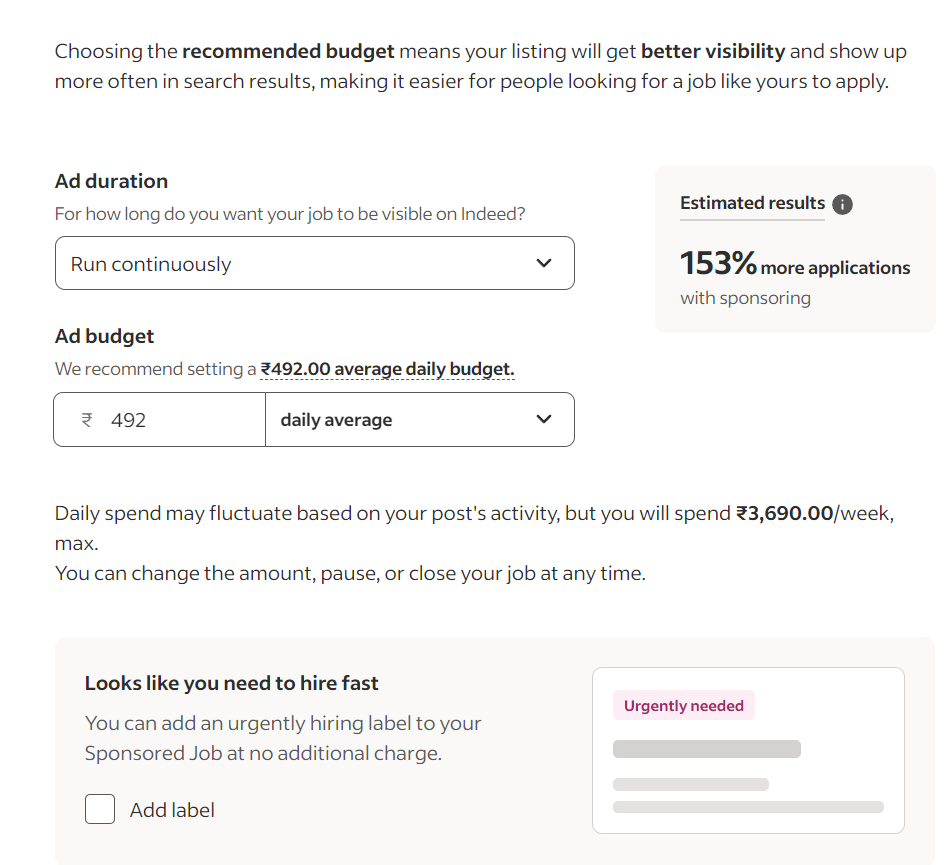
- Platforms like Indeed charge a certain amount to advertise your job posting. According to your budget, you can set an ad run time, which specifies the duration the ad will run on the platform, and an ad budget, which can be set to average daily or average monthly.
You can easily adjust these details according to your budget and run a job posting ad on Indeed. You can also add a label of ‘Urgently Needed’ to sponsor your job posting without any extra charges.
- Finally, you can proceed to payment. Fill in all the required information and make the payment to post the job on Indeed and Glassdoor simultaneously. Ensure you verify your account; if you haven’t done so, you will not be able to post the job successfully.

Why Glassdoor Is Worth Considering
Numerous recruiters post jobs on Glassdoor and Indeed daily. It leads to competition on job search portals. It is essential to select the right place to invest your recruiting resources. The idea of how to post a job on Glassdoor is a brilliant one due to several reasons, which extend beyond the listing of a vacancy:
1. Leverage Employer Branding on Glassdoor: Glassdoor offers specific employer branding features, such as the Employer Profile, that allow you to promote the company culture, values, and success. Stories and testimonials from employees make it an interesting story that draws qualified people and helps it stand out against competitors.
2. Authentic Employee Reviews Build Trust: The Glassdoor review system makes your company trustworthy. When you encourage past and present staff to post authentic reviews, you enhance your profile and signal to potential employees that you are a transparent company, which is becoming a more significant value to top candidates.
3. Respond to Reviews Shows Accountability: Engaging with reviews (both positive and negative) thoughtfully will show candidates that leadership appreciates employee feedback and is ready to implement continuous changes. It establishes a trust before a candidate’s application is submitted.
4. Data-Driven Profile Management: Glassdoor lets you track your profile’s performance and sentiment over time. Following the recurring themes in the reviews and adjusting your message or organizational policies to align with them will help you maintain a strong, appealing presence in the job market.
Conclusion
Glassdoor and Indeed’s partnership has revolutionized the job search portal landscape. Employers can now leverage employer branding on Glassdoor and Indeed’s talent pool to their advantage. By coupling these two platforms, employers can search for a wider range of job seekers and hire the candidates they want. To ensure optimal use of this partnership, follow this guide on how to post a job on Glassdoor seamlessly.
If you are exploring your options for job posting, do consider other leading platforms such as Internshala. By harnessing its talent pool of over 21 million qualified candidates, you can find desirable entry-level, mid-level, and seasoned professionals. Ready to hire new employees? Check out the top recruitment strategies to hire the best candidates for your organization.
FAQs
Answer: No, you cannot post jobs directly on Glassdoor. To post jobs on Glassdoor, you need to post them on Indeed first.
Answer: Yes, if you use an applicant tracking system (ATS) like Workable, you can post and manage your Glassdoor job ads directly through your ATS, often with discounts. The process is quick and easy.
Answer: After you post your job on Indeed, it usually appears on Glassdoor within a few hours. Glassdoor allows you to leverage its features coupled with Indeed to boost your visibility through a combined talent pool and employer branding. This assists you in finding your desired candidate seamlessly.


