
How to Post a Job on LinkedIn?: The 2026 Guide
LinkedIn is a professional network with over 800 million members. It is a powerful platform that connects professionals, employers, and job seekers. For businesses and recruiters, LinkedIn has become an invaluable tool for finding and attracting top talent. With its vast pool of potential candidates and advanced recruitment features, LinkedIn offers a comprehensive solution for posting job openings and sourcing candidates.
In this detailed blog, we will explore the step-by-step process of how to post a job on LinkedIn. We will cover everything from setting up a company page to promoting your job posting.
How to Post a Job on LinkedIn?
Knowing how to post a job on LinkedIn effectively can make a significant difference in the kind of candidates that you attract. With millions of professionals actively present on the platform, LinkedIn provides unsurpassed coverage and accuracy in recruitment. Whether you are a recruiter on your first attempt or a long-time hiring manager, adherence to a systematic procedure will ensure that your ad in the job market stands out in a crowded talent pool. It is a detailed instructional process on how to post a job on LinkedIn and reach out to the most qualified talent to meet your company.


Step 1: Set up a Company Page
When exploring how to post a new job on LinkedIn, it is essential to establish your company’s presence on the platform by creating a LinkedIn Company Page. This page allows you to showcase your brand and present job opportunities. To create a Company Page, follow these steps:
- Log in to your personal LinkedIn account and click on the “For Business” icon in the top-right corner of the homepage

- From the dropdown menu, select “Create a Company Page” at the bottom.
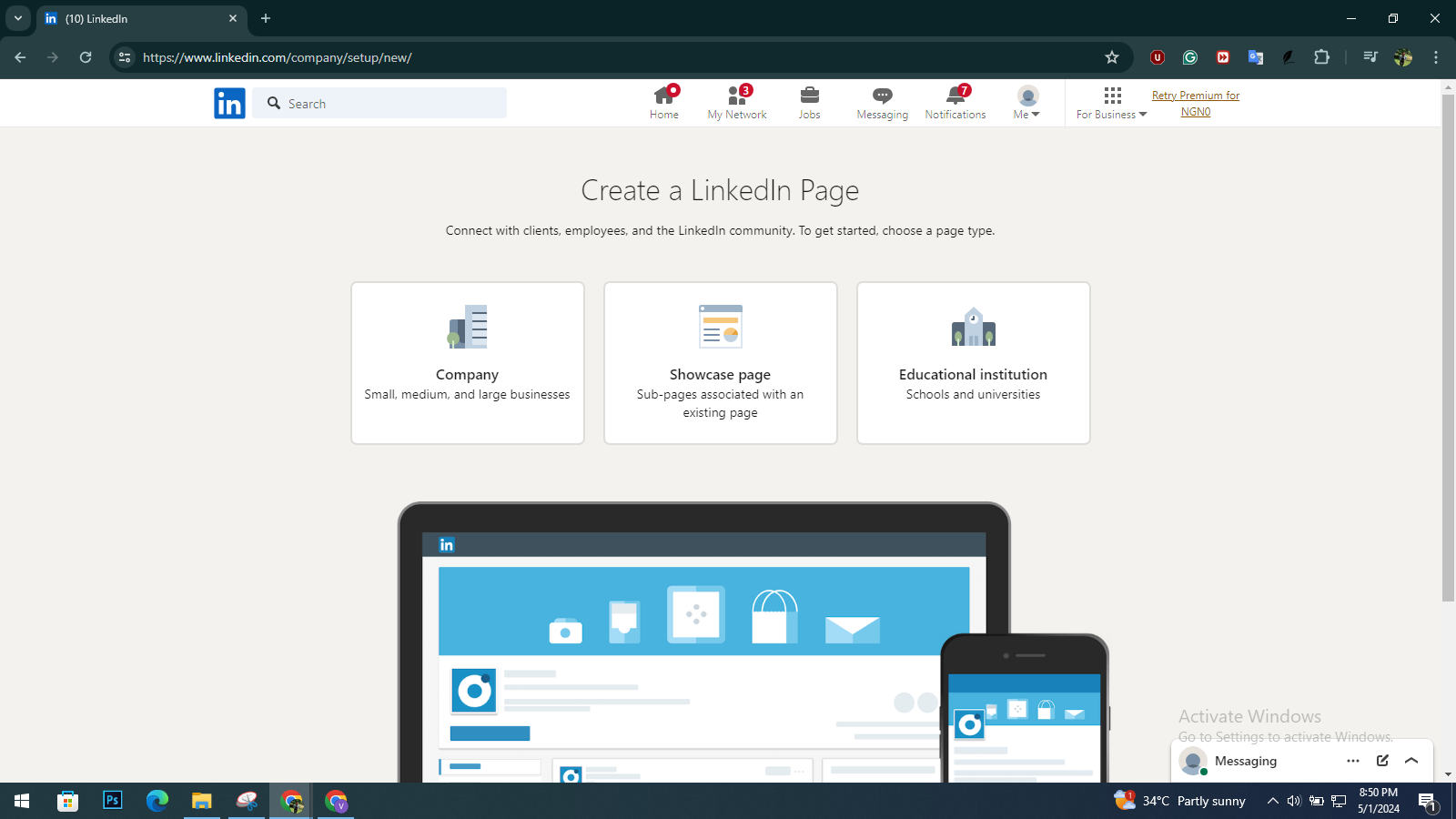
- Choose the type of page you want to create, such as a “Company Page” or a “Showcase Page” (for individual brands or initiatives).
- Enter your company’s information, including the name, website URL, industry, and a brief description.
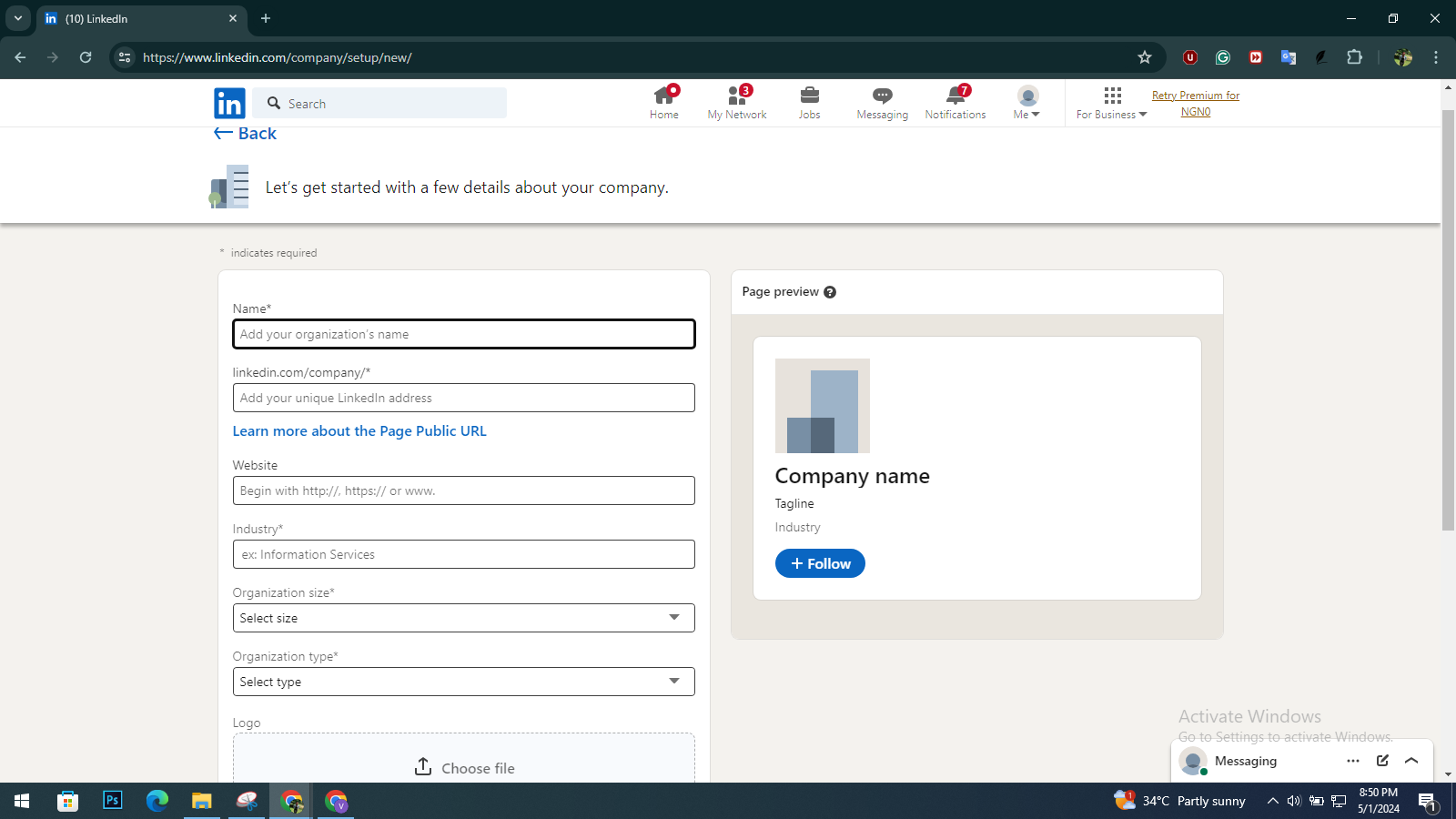
- Upload your company logo and cover image.
- Check the verification box and click “Create Page”.
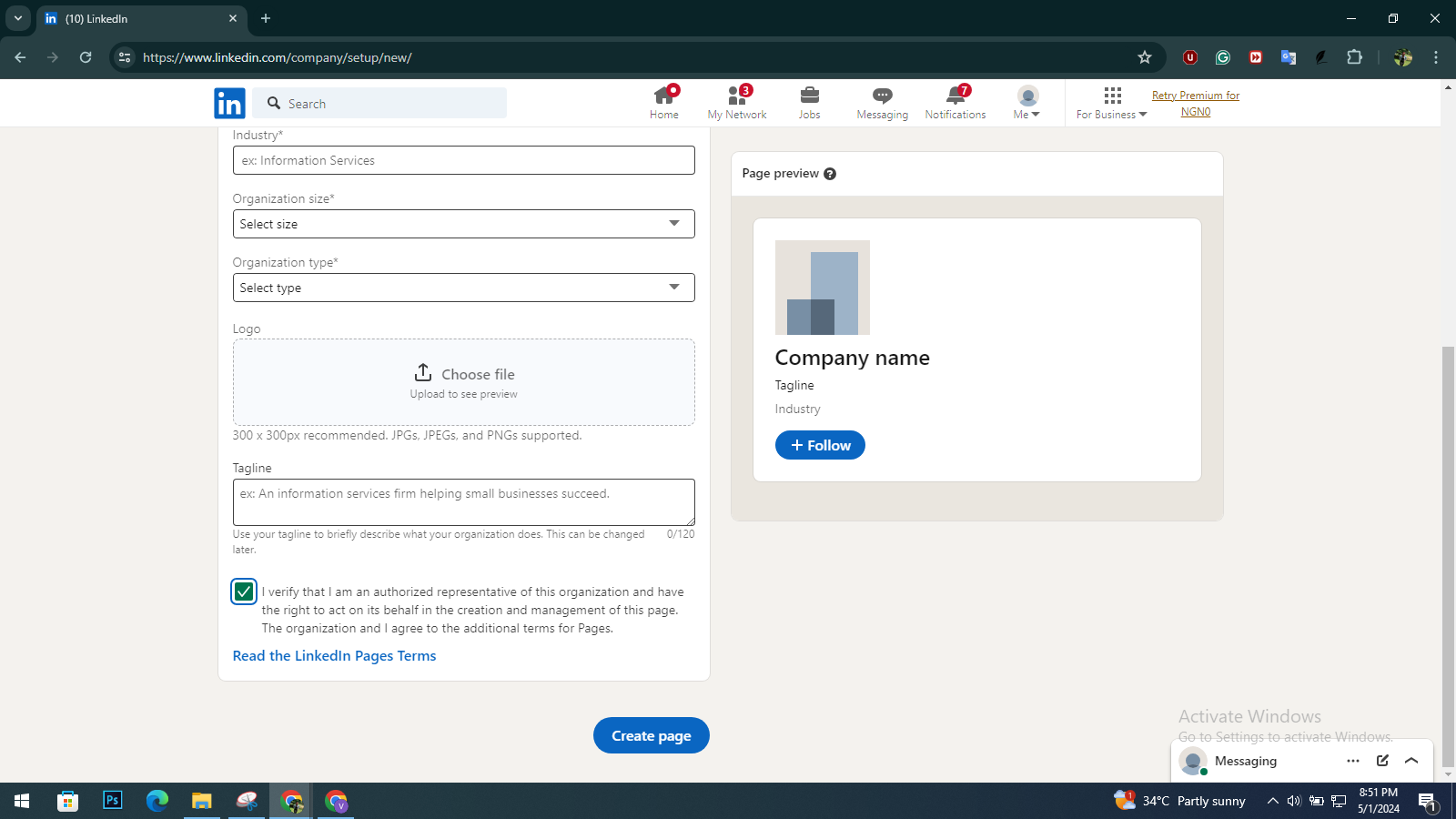
Your Company Page is now ready to attract potential candidates.
Step 2: Sign up for LinkedIn Talent Solutions to Post a Job
LinkedIn Talent Solutions is a suite of tools designed specifically for recruiters and hiring managers. It provides access to advanced features and functionalities to streamline the recruitment process, including the ability to post job openings and manage candidates.
To sign up for LinkedIn Talent Solutions, follow these steps and learn more about how to post a job on LinkedIn:
- On your LinkedIn account, click on the ‘For Business’ icon in the top-right corner of the homepage.
- From the dropdown menu, select ‘Post a Job’.

- On the next screen, click “Sign up for LinkedIn Talent Solutions”.
Once you have signed up for LinkedIn Talent Solutions, you can access a range of powerful recruiting tools, including the ability to post job openings, search for candidates, and manage applications.
Step 3: Provide Job Details
When posting a job on LinkedIn, you will need to provide essential details about the job opening. This information helps potential candidates quickly understand the nature of the role and determine if they meet the basic requirements. Here are the job details you’ll need to provide:

- Job title: Enter the title of the open position.
- Company name: Select your company’s name from the dropdown list.
- Workplace type: Specify whether the position is on-site, remote, or a hybrid arrangement.
- On-site: Employees work from a physical office or location.
- Remote: Employees can work from anywhere, typically at their home or a remote location.
- Hybrid: A combination of on-site and remote work, with employees splitting their time between the office and other locations.
- Job location: Indicate the city, state/province, and country where the role is based. If the position is remote or allows for multiple locations, you can specify “Remote” or list multiple locations.
- Job type: Select the appropriate option based on the nature of the role:
- Full-time
- Part-time
- Contract
- Temporary
- Volunteer
- Internship
- After completing the process, click on ‘Write on my own’ to enter your job description.
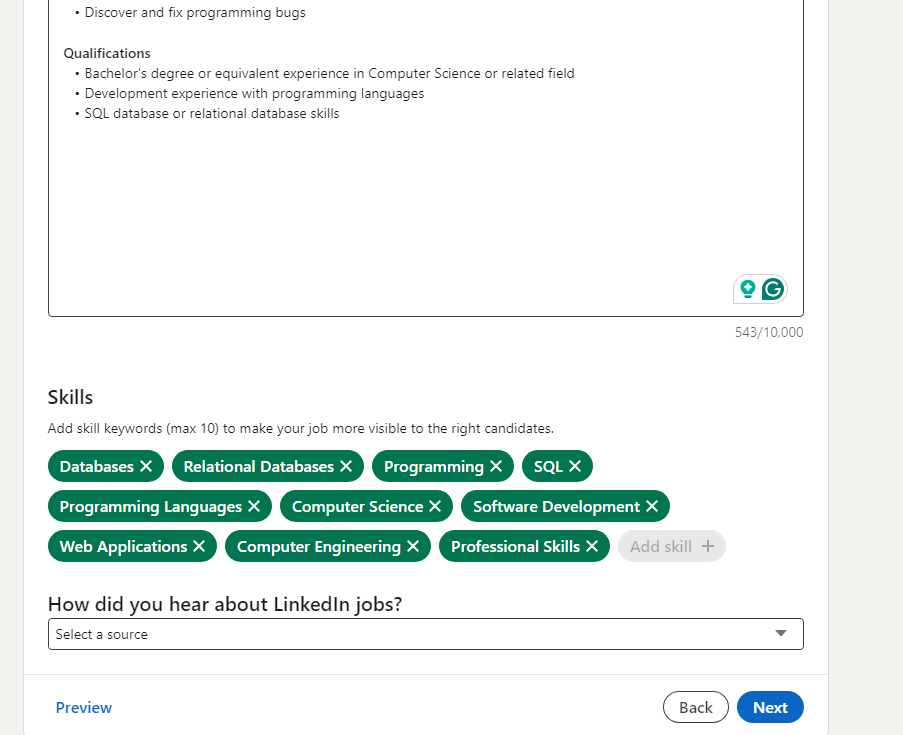
Step 4: Add the Job Description and Required Skills
A job description is one of the most critical components of your job posting, as it provides candidates with a detailed overview of the position’s responsibilities, qualifications, and expectations. Knowing how to write a job description can significantly impact the quality and quantity of applicants you receive.
When writing your job description, consider the following best practices:
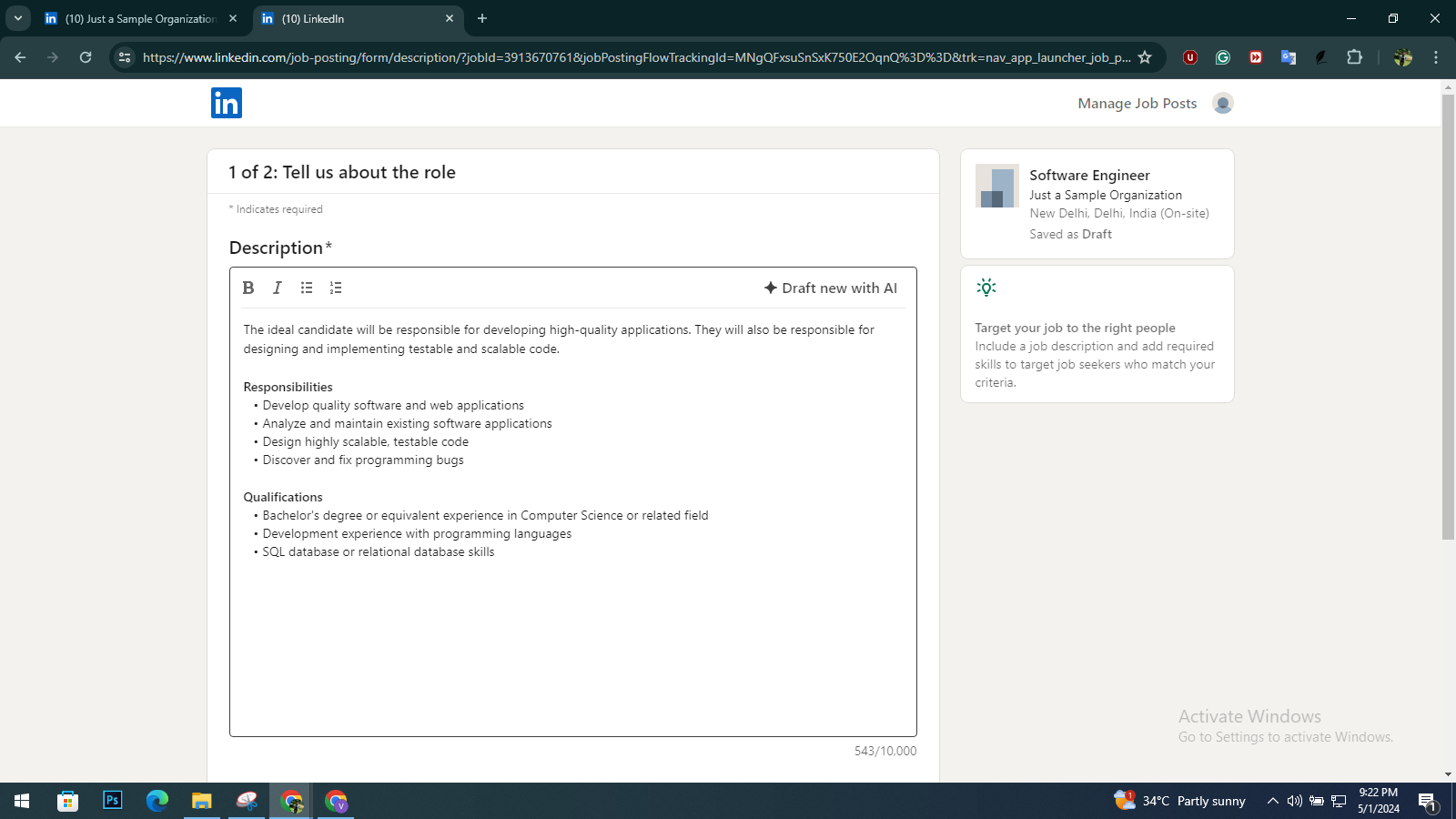
- Start with a compelling introduction or job overview that highlights the key details of the role.
- Clearly outline the essential duties and responsibilities associated with the position.
- List the required qualifications, such as education, certifications, and years of experience.
- Mention any preferred qualifications or additional skills that would make a candidate stand out.
- Use clear and concise language, avoiding jargon or overly technical terms.
Step 5: Define the Application Process & Screening Questions
Once you have provided the job details and description, you will need to define the application process and set up screening questions. LinkedIn allows you to choose how you want to receive applications, either through email or an external website (such as your company’s career page).
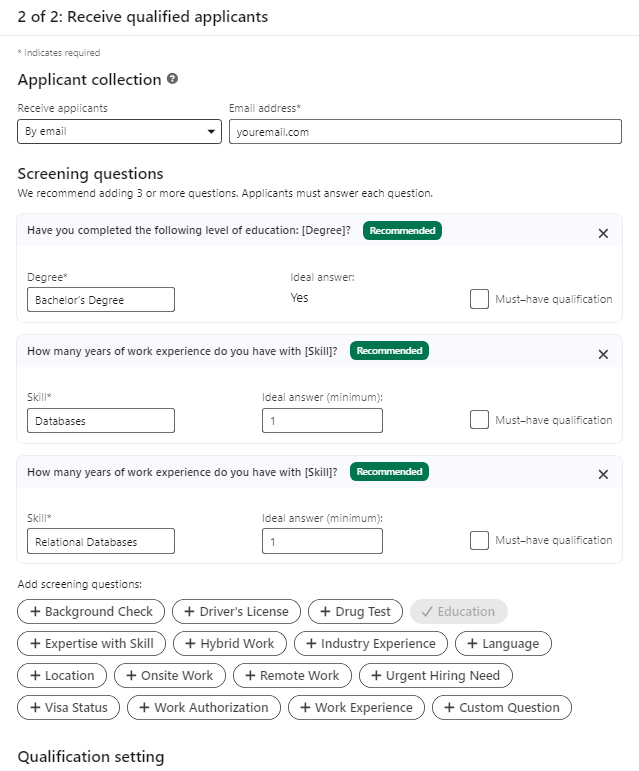
Receive Applicants By Email
If you want to receive job applications via email, follow these steps:
- Select Email Option: Choose the option to receive applications by email and enter your email address. LinkedIn will forward candidate applications to your inbox.
- Add Screening Questions: Use screening questions to filter candidates early. You can choose from predefined options like education, skills, and work experience, or create custom questions.
- Customize Questions: Select relevant questions based on your job requirements or add your own to assess candidate suitability.
- Set Must-Have Criteria: Mark specific answers as “must-have qualifications” to automatically filter applicants.
- Review and Post: Check all settings, confirm your questions, and proceed to post the job.
Receive Applicants through an External Website
Alternatively, if you prefer candidates to apply through your company’s website, follow these steps:
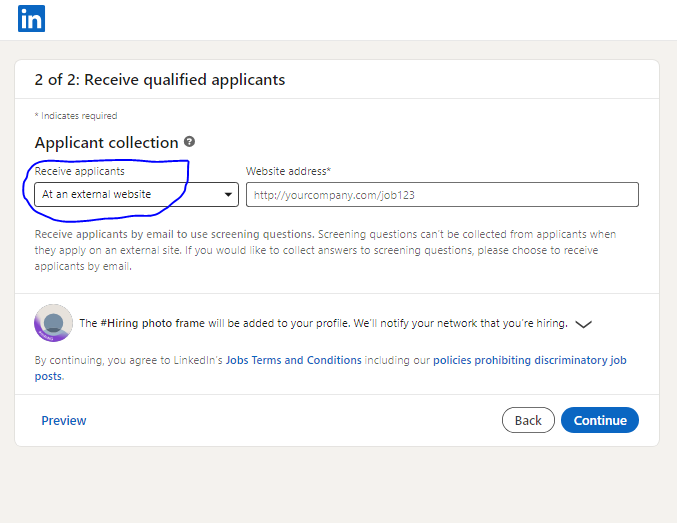
- Select External Website Option: Under ‘Receive applicants,’ choose ‘At an external website.’
- Enter Website Address: Add the URL where candidates should apply (e.g., your careers page or application form).
- Note the Limitation: Screening questions are not available when you select this option, as applications are completed outside LinkedIn.
- Review and Continue: Click ‘Continue’ to proceed and review your job post.
- Post Your Job: Choose whether to promote the job or post it for free using the available option.
How to Boost Your LinkedIn Announcing?
A LinkedIn job announcement is when you share a job opening on the platform to attract potential candidates and increase visibility. To get better reach and engagement, you need to go beyond simply posting the job. Here are some practical strategies to help you boost your LinkedIn job announcement:
- Leverage Your Network: Share your job post with your connections and encourage them to reshare it within their networks.
- Use LinkedIn’s #Hiring Feature: Add the ‘#Hiring’ frame to your profile picture to signal that you are actively hiring and attract more visibility.
- Provide Compensation Information: Including salary details can make your job more attractive and improve application rates.
- Highlight Company Benefits: Showcase perks like remote work, flexible hours, and growth opportunities to appeal to candidates.
- Promote Your Posted Job: After posting your job on LinkedIn, you can promote it to increase its visibility. It involves setting a daily or total budget and submitting your payment information for approval.
How to Manage Your Posted Jobs?
Having understood how to create a job posting on LinkedIn, it’s essential to manage and monitor the applications effectively. LinkedIn provides several tools and features to help you streamline the process. These include the following:
- Review and Filter Applicants: From the ‘Posted Jobs’ page, you can view and filter applicants based on their qualifications, location, years of experience, and more. This helps you quickly identify the most promising candidates.
- Communicate With Candidates: LinkedIn’s built-in messaging system lets you message candidates directly. You can easily ask follow-up questions, request additional information, or schedule interviews.
- Rate and Track Applicants: As you review applications, you can rate candidates as a ‘Good Fit’, ‘Maybe’, or ‘Not a Fit’, to help you keep track of their suitability for the role. This feature makes it easier to manage a large applicant pool and ensure no talented candidates are missed.
- Close or Repost the Job: Once you have successfully filled the position, you can close the job posting to prevent further applications. Alternatively, if you haven’t received enough qualified candidates, you can choose to repost the job to attract more applicants.
Conclusion
Posting a job on LinkedIn is a powerful way to reach a vast pool of potential candidates and find the best talent for your organization. By following this step-by-step guide on how to post a job on LinkedIn, you can create a compelling job posting, leverage LinkedIn’s advanced features, and effectively manage the application process. You can also try other job portals like Internshala, which offers cutting-edge ATS and enables you to hire the best talent in the market.
Want to take your recruitment game to the next level? Check out our blog how to hire employees with tips and challenges to expect when building a talented workforce.
FAQs
Answer: The recommended format for LinkedIn job descriptions is to start with a short description of the role (two or three lines) that outlines the overall scope of the job. This should be followed by three to five bullet points highlighting key achievements or responsibilities. Since LinkedIn does not allow extensive formatting, you can use symbols as bullet list markers to make the content more visually appealing and easy to scan.
Answer: Yes, LinkedIn offers a free job posting option that allows employers to create and publish job listings on their platform at no cost. However, you can choose to pay to promote your job posting.
Answer: When you post a free job listing on LinkedIn, it will remain active until you manually close the posting. However, it will automatically close after 6 months if you don’t.
Answer: To post a job on LinkedIn, a well-developed job description and intelligent use of the platform’s features are optimal.
– Keep your Company Page updated, as candidates review it before applying
– Write a clear, concise job description with role, skills, and benefits
– Use relevant keywords in the job title and description for better visibility
– Add screening questions to filter applicants early
– Include salary details to attract more applications
Answer: The most effective way to post on LinkedIn goes beyond just filling in the required fields. To achieve the best results, follow these tips:
– Use industry-standard job titles and relevant keywords to improve search visibility
– Write a clear, concise job description with well-defined expectations
– Highlight what makes the role attractive to candidates
– Share the job as a LinkedIn post with a personal note
– Encourage your team to repost and amplify reach


